
If you run a WordPress site (or even plan to), security is one of those things you probably know you should care about… but often put off. That’s exactly where “WordPress Security – How To Stop Hackers” comes in.
This course is basically a no-nonsense, beginner-friendly guide to locking down your site without needing to be some cybersecurity wizard. It focuses on real-world threats (not just theory) and walks you through practical fixes you can actually apply right away.
Instructor Reputation
The course is led by Andrew Williams, and if you’ve spent any time browsing WordPress or online business courses on Udemy, there’s a good chance you’ve come across his work before. He’s built a strong reputation over the years, with more than 200,000 students enrolled across his courses and tens of thousands of reviews backing up his credibility. That kind of scale doesn’t happen by accident—it usually means the instructor consistently delivers content that people find useful and easy to follow.
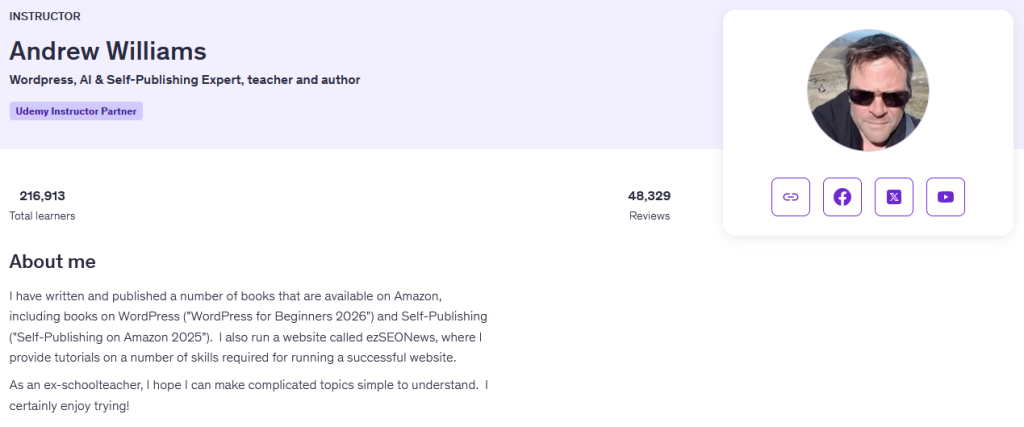
One of the most reassuring things about Andrew is his background as a former schoolteacher. You can really feel that influence in the way he teaches. Instead of jumping straight into technical jargon or assuming prior knowledge, he takes the time to explain why things work the way they do. This is especially important in a topic like website security, which can quickly become overwhelming for beginners. His teaching style is patient, structured, and very approachable—almost like having a tutor walk you through everything step by step.
He’s also not just a teacher in theory—he’s actively involved in the WordPress ecosystem. From writing books (including guides on WordPress and self-publishing) to running his own website where he shares tutorials, he clearly practices what he teaches. That real-world experience shows in the course, particularly when he talks about common mistakes people make with plugins, themes, and site configurations. These aren’t just textbook explanations—they’re insights that come from actually managing and securing websites.
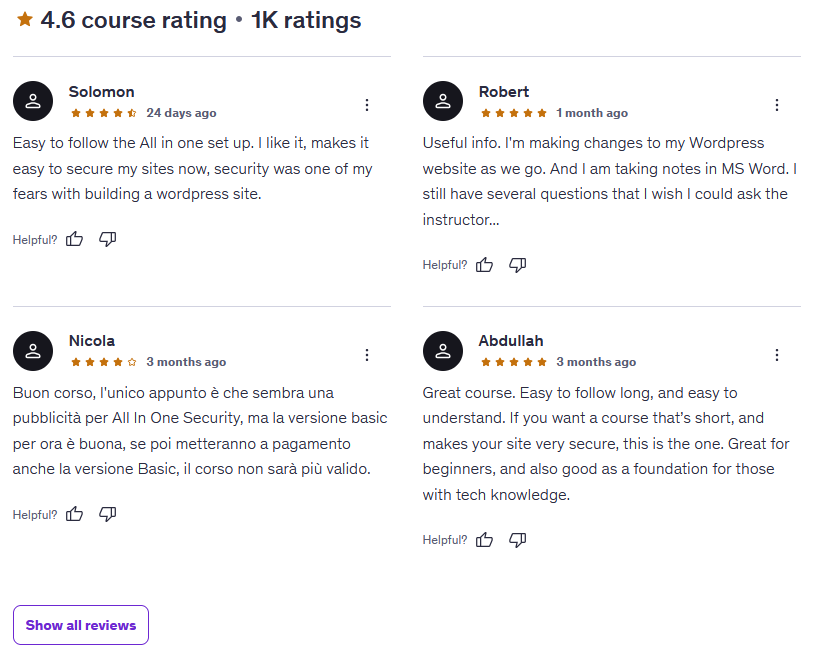
Another thing worth noting is the consistency in student feedback. Many reviews highlight how easy his courses are to follow and how quickly students are able to apply what they’ve learned. That’s a huge plus, especially for a practical topic like security where results matter more than theory. Students often mention implementing changes to their sites immediately, which speaks volumes about how actionable the content is.
That said, Andrew’s style leans heavily toward clarity and simplicity rather than deep technical complexity. For beginners and intermediate users, this is a massive advantage. However, if you’re already experienced in cybersecurity or server-level configurations, you might find his approach a bit too high-level. Still, that’s more about the course’s target audience than any limitation of the instructor himself.
Overall, Andrew Williams comes across as a reliable, experienced, and highly approachable instructor. He’s particularly strong at making intimidating topics feel manageable, which is exactly what you want when learning something like WordPress security.
Course Structure
The structure of “WordPress Security – How To Stop Hackers” is one of its biggest strengths. It’s clearly designed with beginners in mind, but it doesn’t feel overly simplistic or rushed. Instead, it follows a logical progression that builds your understanding step by step, making sure you actually grasp what you’re doing—not just blindly follow instructions.

The course is essentially divided into two major phases:
1. Understanding the Threat Landscape
The first part of the course focuses on building a solid foundation. Before you even touch any settings or plugins, the instructor takes time to explain:
- Why hackers target websites in the first place
- The different types of threats (bots, brute force attacks, spam, etc.)
- What makes certain WordPress sites more vulnerable than others
- How user behavior (like poor plugin choices or weak passwords) plays a huge role in security
This section is surprisingly important. A lot of courses skip this and jump straight into “click here, install this,” but here you actually learn why you’re doing each step. That context makes everything else in the course feel more meaningful and easier to remember.
Another nice touch is that this section doesn’t force you to take action right away. You can simply absorb the information if you want, which makes it beginner-friendly and less overwhelming.
2. Hands-On Website Security Setup
The second half of the course is where things get practical—and this is really the core of the experience.
Instead of throwing multiple tools at you, the instructor focuses on one main WordPress security plugin and walks you through:
- Installing the plugin
- Configuring each setting step-by-step
- Understanding what each feature does
- Applying best practices to secure your site
This approach keeps things simple and efficient. You’re not juggling multiple dashboards or trying to figure out which tool does what. Everything is streamlined into a single, guided process.
What makes this section especially effective is the “follow along” style. You can literally open your own WordPress dashboard and mirror what the instructor is doing in real time. This turns the course from passive learning into active implementation, which is exactly what you want for something like security.
3. Reusability and Scalability
One standout feature of the course structure is the emphasis on reusability. Once you’ve set up your security configuration, the course shows you how to:
- Export your settings
- Apply them to other WordPress sites
This is a huge time-saver if you manage multiple websites. Instead of repeating the entire process from scratch, you can replicate your setup in seconds. It’s a small detail, but it adds a lot of long-term value.
4. Flexible Learning Experience
Another thing worth mentioning is how flexible the course feels. You have a couple of options depending on your learning style:
- Follow along actively: Apply everything step-by-step on your own site
- Watch first, implement later: Understand the concepts before taking action
- Pick specific sections: Jump to the parts you need most
This flexibility makes the course accessible to a wide range of users, from complete beginners to those who just want to tighten up their existing setup.
Overall Impression
The course structure is clear, logical, and highly practical. It avoids unnecessary complexity and focuses on what actually matters: helping you secure your site in a way that’s easy to understand and implement.
It’s not overloaded with theory, and it doesn’t try to impress with advanced jargon. Instead, it delivers a streamlined learning experience that takes you from “I’m worried about hackers” to “My site is properly secured” in a very straightforward way.
For beginners especially, this structure is a huge win.
Content Quality
When it comes to content quality, this course does a really solid job of balancing simplicity, practicality, and relevance—which is exactly what you want for a topic like WordPress security.
First off, the biggest strength here is how beginner-friendly everything is. The instructor assumes you have little to no technical background, and instead of overwhelming you with cybersecurity jargon, he breaks everything down into plain English. Concepts like brute-force attacks, bots, and vulnerabilities are explained in a way that actually makes sense, even if you’ve never touched security settings before.
But what really elevates the content is that it’s not just theory—it’s immediately actionable.
You’re not just learning what hackers do—you’re learning:
- How to spot potential weaknesses in your own site
- What specific settings need to be changed
- How to implement those changes step-by-step
- Why each change actually matters
That “why” factor is a big deal. A lot of courses skip it and just tell you what buttons to click. Here, you actually understand the reasoning behind each step, which makes it much easier to retain the information and apply it in different situations.
Another strong point is the hands-on walkthrough style. The instructor doesn’t rush through the setup process. Instead, he carefully walks through each configuration inside the security plugin, explaining what each option does and whether you should enable it. This removes a lot of the guesswork that usually comes with WordPress plugins, especially for beginners who might otherwise feel intimidated by all the settings.
The course also does a great job of focusing on real-world threats rather than edge cases. It prioritizes the kinds of attacks that actually happen most often—like automated bot attacks and weak login security—rather than diving too deep into rare or highly technical exploits. This keeps the content practical and relevant for the average website owner.
One feature that stands out is the ability to replicate your security setup across multiple sites. This adds a layer of efficiency that many courses overlook. If you’re managing several WordPress sites, this alone can save you hours of repetitive work.
In terms of pacing, the course is well-balanced. It doesn’t feel rushed, but it also doesn’t drag. Each lesson builds logically on the previous one, and there’s a clear sense of progression from understanding threats to actually securing your site.
That said, the simplicity of the course can also be its limitation. If you’re someone with a more advanced background—like experience with server-level security, firewalls, or custom configurations—you might find the content a bit too basic. It focuses heavily on plugin-based solutions and standard best practices, rather than diving into deeper technical territory.
Still, for its target audience (beginners and intermediate users), the content quality is excellent. It’s clear, practical, and designed to get real results—not just theoretical knowledge.
Overall Course Rating – 8.7/10
For “WordPress Security – How To Stop Hackers”, I’d give this course a strong 8.7 out of 10, and that score reflects how well it delivers on its promise: helping everyday WordPress users secure their websites without needing advanced technical skills.
This is one of those courses that doesn’t try to be flashy or overly complex—it just focuses on being genuinely useful. And in that sense, it absolutely succeeds. By the time you finish, you don’t just feel more secure—you’ve actually taken concrete steps to protect your site.

What really stands out
One of the biggest highlights is how practical and implementation-focused the course is. You’re not sitting through long lectures filled with abstract concepts—you’re actively making changes to your site as you go. That hands-on approach makes a huge difference, especially for beginners who might otherwise feel stuck or unsure where to start.
The instructor’s teaching style also plays a big role in the course’s effectiveness. Andrew Williams keeps things simple, clear, and easy to follow, which makes even intimidating topics feel manageable. His background as a teacher really shows here.
Another major plus is the time efficiency. The course doesn’t waste time on unnecessary details. It focuses on the most important security measures and shows you how to implement them quickly and effectively. For busy website owners, that’s a huge advantage.
Where it falls short
The main drawback is that the course stays within a fairly basic-to-intermediate level. While that’s perfect for beginners, more advanced users might feel like it doesn’t go deep enough into topics like server hardening, advanced firewalls, or custom security configurations.
Additionally, the heavy reliance on a single plugin—while great for simplicity—might not appeal to users who prefer a more layered or customizable security approach.
At the end of the day, “WordPress Security – How To Stop Hackers” is all about confidence and clarity. It takes a topic that often feels overwhelming and breaks it down into something approachable and actionable.
It may not turn you into a cybersecurity expert, but it will give you the tools and knowledge to protect your site effectively—which, for most people, is exactly what matters.